Proxmox VE is an open source platform for running and managing KVM virtual machines (VMs) and LXC containers. For an overview of the Proxmox VE platform and how it compares to other open source virtualization management platforms, you can read “Comparing Open Source Virtualization Platforms” on the LINBIT® blog.
A cornerstone of Proxmox VE design is simplicity and indeed, this is what makes it a popular virtualization management platform, especially in homelabs and small business deployments. While Proxmox VE might not see deployments on as large a scale as do other platforms such as CloudStack, Kubernetes, OpenNebula, and VMware, it is possible to create production-ready deployments for small to medium-sized business use cases.
This article will overview some of the LINSTOR® features and benefits in Proxmox VE.
For readers already familiar with Proxmox VE and LINSTOR
If you are already familiar with Proxmox VE and LINSTOR, and just knowing that the two solutions can work together is enough to make you interested, you can likely skip reading the high-level overviews in the rest of this article. To get started creating a production-ready LINSTOR in Proxmox hyperconverged deployment, you can download the LINBIT-created how-to guide, Getting Started With LINSTOR in Proxmox VE. This guide has step-by-step instructions intended for creating production-ready deployments.
📝 NOTE: It is also possible to use LINSTOR with Proxmox VE in a disaggregated architecture, where the LINSTOR storage cluster is distinct from the Proxmox VE cluster.
If you just want to test the waters quickly, you can read the “How to Setup LINSTOR on Proxmox VE” article on the LINBIT blog. LINBIT Solutions Architect, Ryan Ronnander, and LINSTOR Proxmox plugin lead developer, Roland Kammerer, wrote the article. This article was written for users interested in getting up and running quickly, for basic use and testing purposes.
There is also a complimentary blog article, “Setting Up Highly Available Storage for Proxmox Using LINSTOR and the LINBIT GUI” that follows the procedural flow of the just-mentioned “Setting Up” article but takes a GUI, rather than CLI approach to the setup.
Conceptual background
Before exploring some LINSTOR features and benefits in Proxmox VE, it might help to offer some background about storage in Proxmox VE. Proxmox VE supports VM disk images stored on local storage, within a directory of a local file system, or on LVM or ZFS logical volumes. You can also store Proxmox VE managed VM disk images on shared storage, for example, an iSCSI target, an NFS share, Ceph, or others.
Besides the officially supported storage types mentioned in the Proxmox VE Administration Guide, you can also use third-party storage in Proxmox VE. You do this by loading external, third-party storage plugins that interface with Proxmox VE. Third-party storage plugins use the same API plugin framework as do the Proxmox “natively included” plugins, such as the storage types already mentioned. The difference is that Proxmox (the company) does not support nor develop these third-party plugins.
The LINBIT-developed LINSTOR Proxmox plugin, is an example of a third-party Proxmox storage plugin. The LINSTOR Proxmox plugin is open source, just as Proxmox VE and LINSTOR itself are. The LINBIT team has developed and maintained the LINSTOR Proxmox plugin since 2016, starting with Proxmox version 4.3, about midway through the Proxmox VE lifespan.
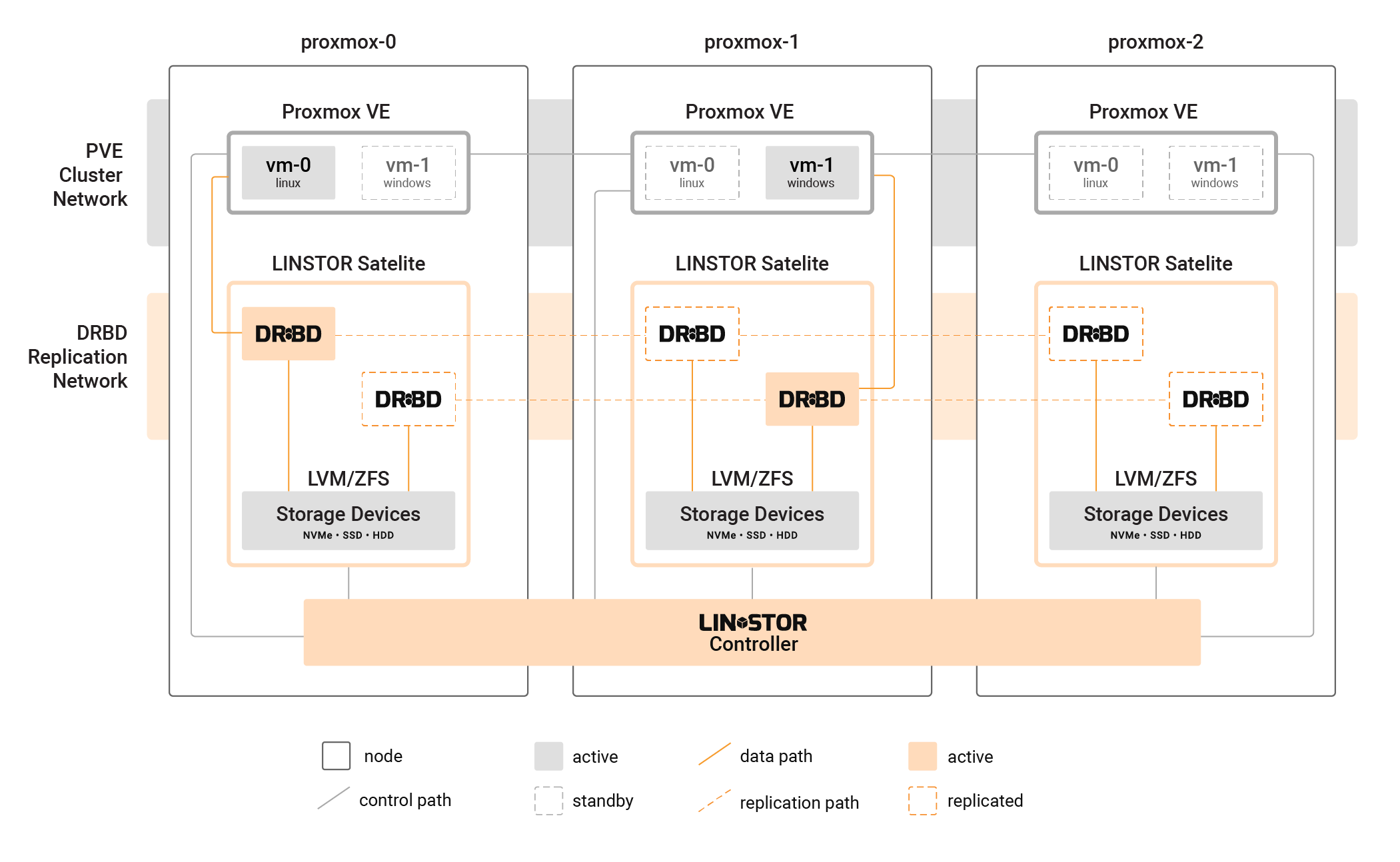
Benefits of LINSTOR-managed shared storage in Proxmox VE
With all the choices for a variety of storage types in Proxmox, speaking to the benefits of choosing a third-party solution, LINSTOR, is likely necessary.
LINSTOR Performance benefits
While not a strict requirement, LINSTOR is typically used to manage DRBD®-replicated storage volumes for high availability and disaster recovery. Both LINSTOR and DRBD have modest CPU and memory requirements, compared to other replicated storage solutions. Since DRBD 9.3, you can even fine tune DRBD memory requirements.
In hyperconverged Proxmox VE deployments, other shared storage solutions can introduce performance bottlenecks because of the need to still access data over the network. However, using LINSTOR with local storage in a hyperconverged Proxmox VE cluster allows each VM to consume local disk resources and achieve near-native hardware performance. This data locality enables VMs to access their data directly, without the overhead of network latency, resulting in improved performance and efficiency compared to other shared storage solutions.
LINSTOR and DRBD will also require fewer CPU and memory resources than some other shared storage solutions. Because of more efficient CPU and memory use, you might also be able to deploy LINSTOR in a Proxmox VE cluster with smaller network bandwidth between cluster nodes than you would be able to otherwise.
Cost savings
A corollary of the performance benefits of using LINSTOR in Proxmox VE clusters is that you can save money on hardware costs, as you might be able to “get by with less” than you would by using a more resource-hungry storage solution.
LINSTOR supports using COTS hardware
LINSTOR and DRBD are also not tied to a specific vendor’s hardware. You are free to use commercial off-the-shelf (COTS) hardware with your Proxmox VE and LINSTOR hyperconverged cluster.
Easier recovery and data control
Unlike some SDS storage solutions, LINSTOR does not hijack your data. Data remains yours and you can recover it from disaster, if the underlying physical storage devices are healthy enough, by using common Linux tools, whether or not LINSTOR is up and running.
Creating highly available VM disk images in Proxmox VE
Proxmox VE has its own ha-manager utility for managing highly available resources within a cluster. HA resources within a Proxmox VE cluster will be VMs or containers. A requirement for using ha-manager for creating HA resources in Proxmox VE is that the resources (VMs or containers) must exist on “shared storage”, such as that which the LINSTOR Proxmox plugin presents to Proxmox VE.
With HA in Proxmox activated, you can prevent service disruptions in the case of node-level failures. Because LINSTOR will create and maintain perfect disk image replicas on other nodes in your Proxmox VE cluster, workloads can seamlessly fail over to healthy nodes. With HA in your Proxmox VE cluster you can also live migrate virtual workloads (VMs and containers). For example, if you needed to perform maintenance on a node currently running services in your cluster, you could migrate those services to other nodes while you worked on the node, without disruption.
Also, unlike ZFS over iSCSI, another shared storage option in Proxmox VE, which uses point-in-time snapshots to achieve HA in Proxmox VE, LINSTOR uses DRBD real-time data replication for HA. This way, peer storage nodes in the cluster have perfect up-to-date copies of data supporting services running on a primary node. This is great for peace of mind when running virtualized workloads that have a frequent read and write I/O pattern, such as databases, messaging queues, and financial software such online payment services. In use cases such as these, relying on ZFS snapshots for HA might leave you with gaps in data when services fail over.
Data locality in Proxmox VE
When using LINSTOR in Proxmox VE, you have the flexibility of specifying data replica counts and constraining replica placement so that when virtualized workloads fail over in your cluster, they do so in expected ways. You can even take advantage of DRBD diskless connections, where nodes without a local storage replica can still serve read requests for data, from a peer node with a replica, over a network connection.
Expanding and shrinking storage in Proxmox VE
LINSTOR makes resizing disks easier. You can resize LINSTOR storage volumes with a single command, rather than the many steps needed when using a logical volume manager. If the underlying storage layer supports it, for example, LVM or ZFS, you can even shrink storage volumes, even for deployed resources1. Of course, all the regular warnings around backing up your data and shrinking file systems on top of the storage first would apply. If you grow your volume definition size in LINSTOR, you just need to grow your file system afterward.
Flexible storage management
By abstracting storage, LINSTOR can help you do things such as create tiered storage offerings in Proxmox VE. If you have different storage media, for example, NVMe devices, SSDs, and HDDs, you can create different LINSTOR storage pools for each media type. By using the LINSTOR Proxmox plugin, you can offer these different storage offerings in Proxmox VE, assigning VMs to these to meet your needs, or based on customer subscription tiers.
Using LINSTOR to abstract storage in Proxmox also gives you the flexibility to more easily swap out, upgrade, add, and otherwise work with the physical devices that back your LINSTOR storage pools, without interrupting Proxmox VE workloads.
Adding Proxmox VE and LINSTOR nodes is also easily done, if you might need to scale your infrastructure to meet demands from your workloads or customers.
Conclusion and next steps for getting started with LINSTOR in Proxmox VE
Hopefully this LINSTOR in Proxmox VE overview gives you a basis for exploring using LINSTOR for shared storage in Proxmox VE. If using LINSTOR in an enterprise-grade, production-ready Proxmox VE cluster is your goal, you can start out with the LINBIT-created how-to guide, Getting Started With LINSTOR in Proxmox VE. This guide has step-by-step instructions for deploying LINSTOR in a hyperconverged Proxmox VE cluster and is intended to help you create production-ready deployments. You can read the “How to Setup LINSTOR on Proxmox VE” article on the LINBIT blog for simpler getting started instructions if you just want to do some testing first.
For help with enterprise deployments, questions about LINSTOR support and development, you can [reach out to the LINBIT team](https://linbit.com/contact-us/]. For help from the greater community of LINBIT software users, you can join the LINBIT Community Forum.
- Since LINSTOR version 1.8.0. See details in the LINSTOR User Guide.↩︎